Scheduling
Set the schedule once. It runs every week.
Every staff member, room, and student in one calendar. Set it once, and LogPose keeps it running — every reschedule, reminder, and change handled automatically.
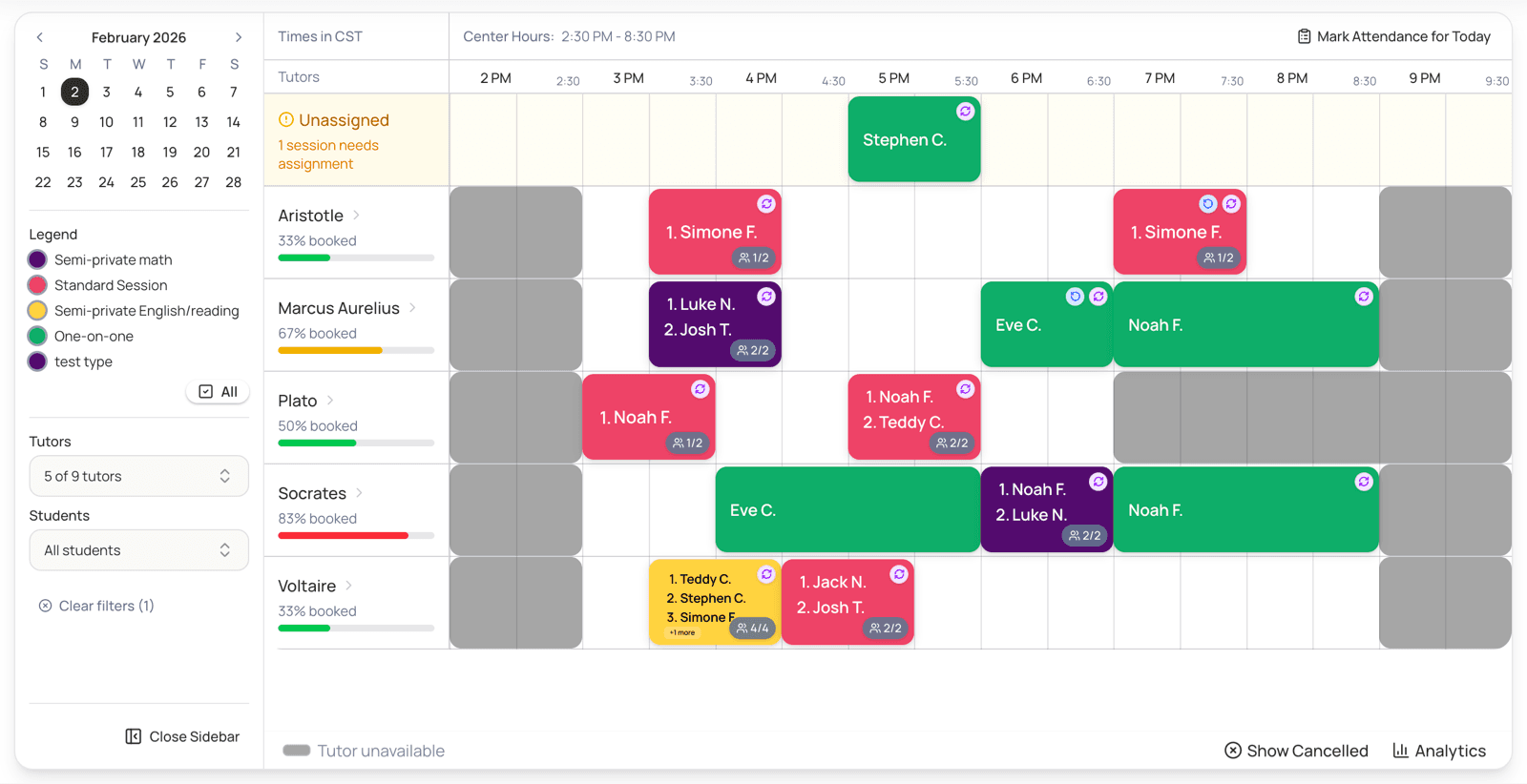
Your whole week at a glance
Drag to reschedule, tap a session to see who's in it. Day and room views answer “who's free at 4pm?” in seconds.
Recurring schedules
Weekly schedules that build themselves
- Give each student a weekly time and LogPose books a qualified, available staff member automatically — no dropdown guessing.
- Students at the same time and staff member group into one session on their own, up to the capacity you set.
- Pause for vacations, resume later. Preview every change before it happens.
Your center's rules, enforced automatically
Set your policies once. LogPose holds the line on every booking, for every staff member and every parent.
Cancellation windows
Parents reschedule within the limits you set — not the night before.
Capacity & qualifications
Sessions respect room capacity and which staff are cleared to teach what.
Holidays & hours
Mark a closure once; the calendar keeps that day clear for everyone.
hours saved every week
spreadsheets to keep in sync
calendar for staff, parents, and you
Reschedules without the phone tag
- Parent reschedules and staff time off land in one approve-or-deny queue.
- LogPose suggests the best open slots for you — approve the right one in a tap.
- Approving updates the calendar, flags anything it affects, and texts and emails everyone — automatically.
Staff availability that's always current
Staff keep their own hours and time off up to date, and Google Calendar sync blocks the slots they can't make — it all flows straight into your calendar.
Scheduling questions
Yes. When students have the same time, session type, and staff member, LogPose groups them into one session automatically, up to the capacity you set. Group tutoring works out of the box.
Staff request time off from their portal. When you approve, their availability is blocked for those dates and any affected session is flagged so you can reschedule it — nothing slips through.
Yes. Sessions appear on connected Google Calendars, and a staff member's personal events block their availability so you never book over a doctor's appointment.
Yes. Cancellation windows, reschedule limits, allowed start times, room capacity, staff qualifications — you define the guardrails and LogPose enforces them on every booking.
Upload your student list from a spreadsheet or your previous software and LogPose maps the columns for you. Most centers are up and running in a week, and our onboarding service can handle the whole move.
See how LogPose works for your center
Or watch the demo first